In the app: sidebar › Knowledge bases
A knowledge base is a set of documents your assistant can search: product manuals, policies, notes, saved web pages. When Aria, an agent or a workflow needs an answer from your documents, it searches the knowledge base and gets back the most relevant passages (short pieces of text) to answer from. A source is one thing you added: a file, a web page, an open tab, pasted text, or text indexed by a workflow.
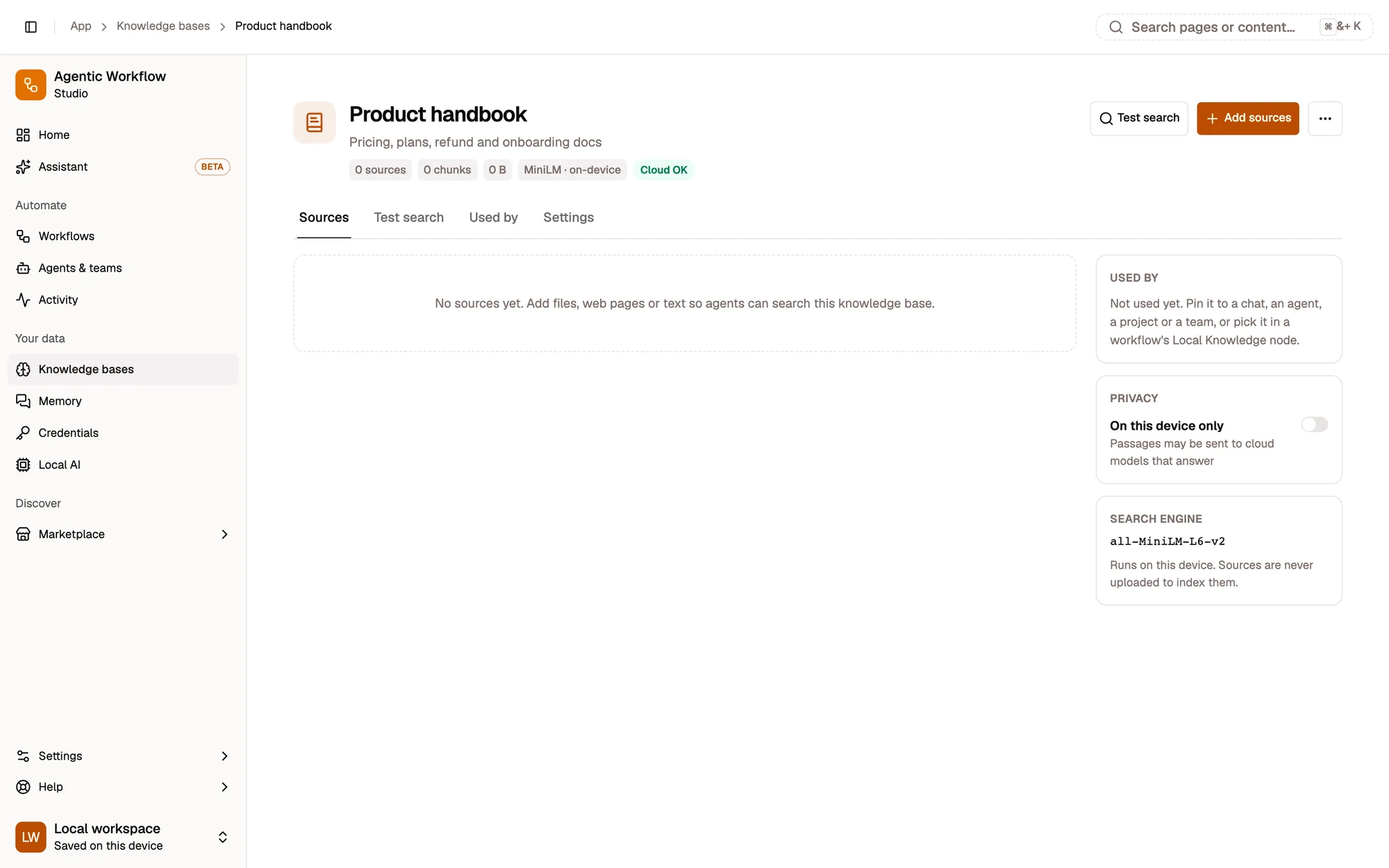
- Add sources: files, web pages or text
- Test search
- Privacy: Cloud OK or Device only
- Search engine, on this device
- Add sources. Files, web pages, open tabs (extension) or pasted text, indexed on this device.
- Test search. See the passages an agent would get, with their scores, before you rely on them.
- Privacy. Cloud OK or Device only: whether its passages may reach a cloud model.
- Search engine. The embedding model the base was built with, running on this device.
The Knowledge bases list shows one card per base, with sources · chunks · size, the search engine it was built with, its privacy badge and Used by. Empty, indexing and cloud-built bases stand out. New knowledge base asks for a name, then you add sources and choose who may read it.
What you can do
Section titled “What you can do”Use it everywhere
Section titled “Use it everywhere”| Where | How |
|---|---|
| Chat with Aria | Click the knowledge bases chip in the composer and pin one or more. Aria searches them and cites the passages. See Knowledge in chats & agents. |
| An agent, a project or a team | Pin it in the agent builder’s Knowledge tab, a project’s files, or a team’s settings: every chat they take part in uses it. |
| A workflow | The Local Knowledge node reads it; the RAG Agent, Q&A Agent and Tools Agent answer from it; the Indexer adds to it. |
In short
Section titled “In short”Add sources
Section titled “Add sources”Open a knowledge base and click Add sources: drop files (PDF, TXT, Markdown, CSV, JSON, HTML), list web pages, pick open tabs (extension) or paste text. Each source shows its own status, and indexing keeps going if you close the dialog. Adding a source that is already there updates it in place. Step by step.
Test search
Section titled “Test search”Test search shows the ranked passages an agent would get for a question, with a score and a dashed cut-off line at 0.35, and lets you search as a given agent or node. How to read it.
Privacy: Cloud OK or Device only
Section titled “Privacy: Cloud OK or Device only”Cloud OK lets passages reach the cloud model that answers. Device only shows them to on-device models only: cloud chats skip the base and say so, and workflow nodes stop or answer without it. Details.
Change the search engine (re-embed)
Section titled “Change the search engine (re-embed)”A knowledge base always searches with the embedding model it was built with. Settings › Search engine › Re-embed with… moves it to another model; searches keep using the old one until the new copy is complete. Step by step.
Knowledge bases are not limited by your plan: plans only limit what is stored on our servers, and knowledge bases are stored on your device.
Related
Section titled “Related”- Using knowledge in chats and agents
- Embeddings and vectors
- Local AI: install another on-device embedding model